GUIDE
How to use Launchrace
Everything you can do here, step by step, with pictures. Numbers on a picture match the list beside or under it. If you are new, read from the top; if you know what you want, use the list of steps.
Finding and backing products
You do not need an account to look around. You need one to vote, save, follow and comment.
Start on the home page
The home page shows what is launching today and the Arena, where makers can pay for a spot on the home page. Paid spots are always marked Sponsored.
The numbers at the top are real: they count the people who actually visited, and nothing is made up.
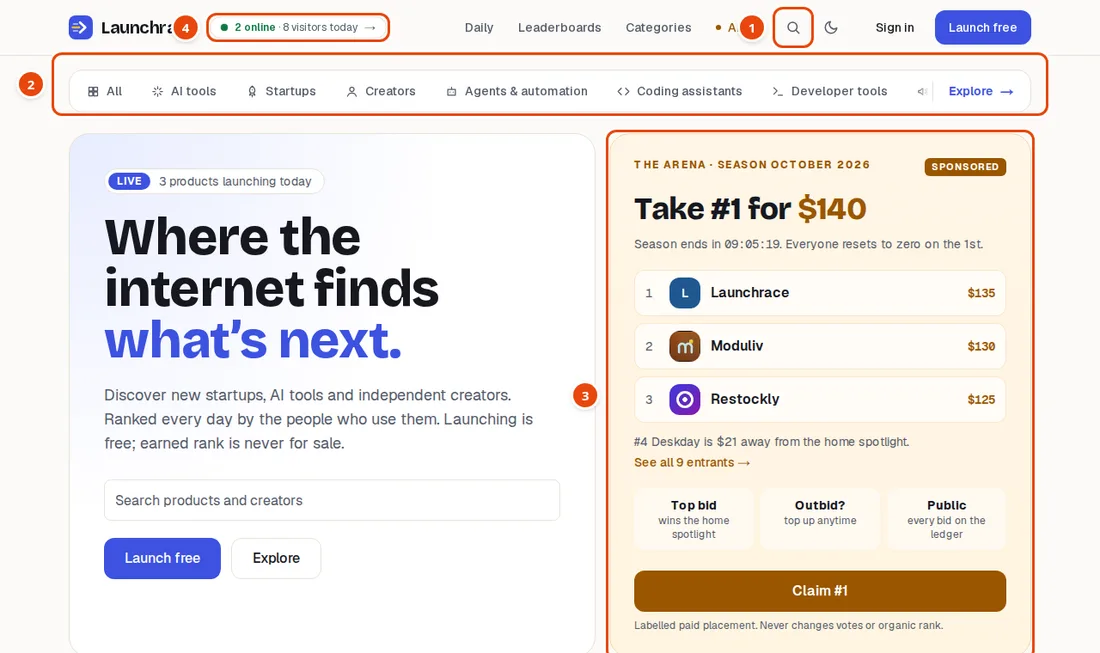
- Search for any product
- Browse by type or category
- The Arena: labelled, paid placement
- Live visitors, measured and never invented
Browse by type or category
The bar under the header lists the kinds of product: AI tools, Startups and Creators, then the busiest categories. Slide it sideways to see more. On a phone, swipe it.
Explore opens the full list of categories.

- Slide sideways for more types and categories
- Explore: every category
Search
Type the start of a product name or a topic. Suggestions appear as you type. Press Enter for a full results page, which you can narrow by type, category, price and platform.
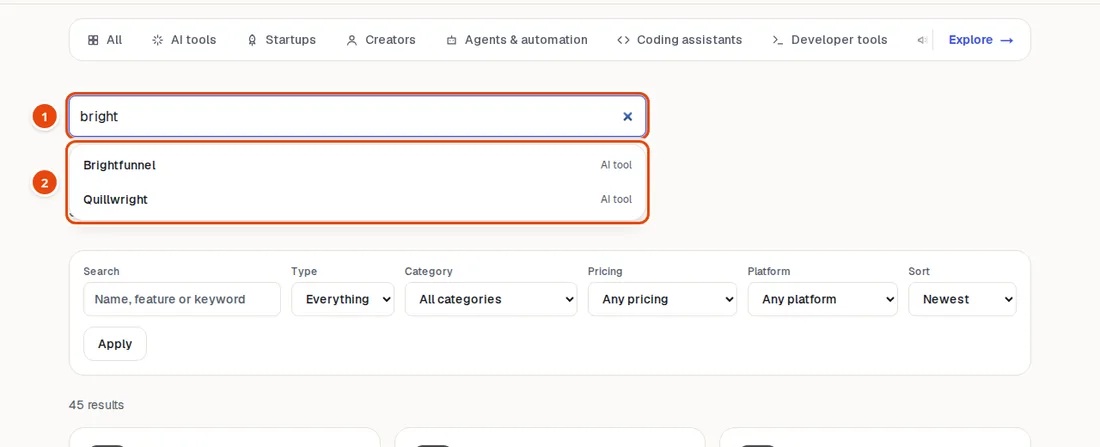
- Type a name, a word or a tag
- Suggestions appear as you type: press Enter or click
Open a product and back it
A product page shows what it does, its pricing and platforms, and its launches. Under the name you can Upvote, Save to read later, Follow to hear about its launches, and Share.
A blue check beside the name means the maker proved they own the website. It is not an endorsement.
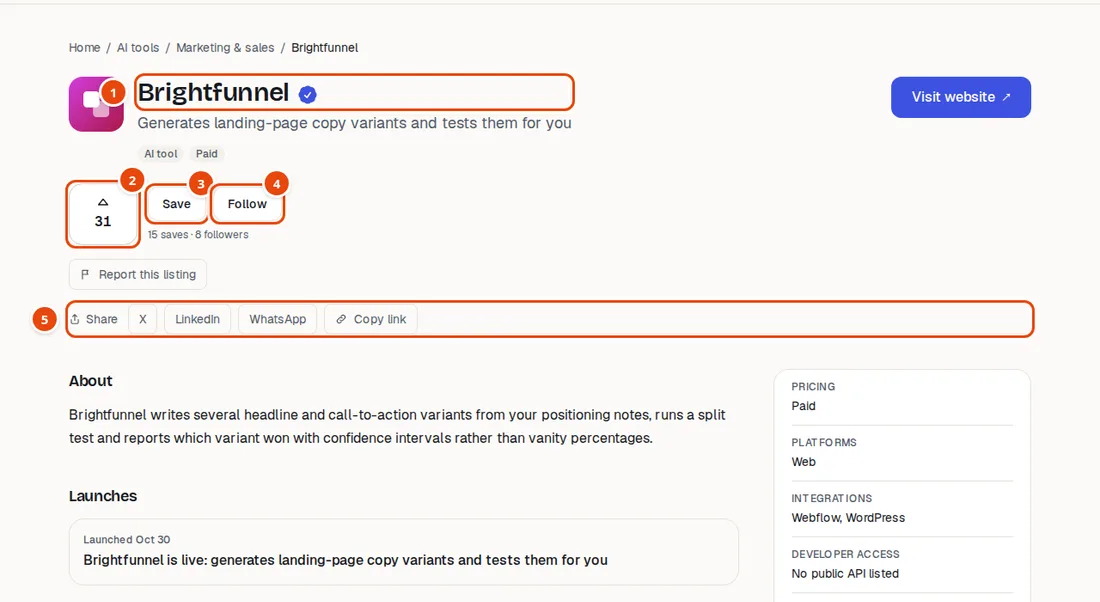
- The blue check means the maker proved they own the website
- Upvote (needs a confirmed email)
- Save it to read later
- Follow it to hear about its launches
- Share it
- You must confirm your email before you can vote.
- Votes from accounts less than 24 hours old are saved but only counted once the account is a day old. This stops fake accounts from swinging a race.
- Something wrong? Use Report this listing. Reports go to the moderators.
Get a reminder for an upcoming launch
When a product is scheduled to launch on a later day, the Follow button becomes Remind me. You get one email on launch day, and nothing else.

- Get one email on launch day
See how things rank
Every day is a race: products launching that day are ranked by votes from confirmed people between midnight and midnight (UTC). Leaderboards show today, this week, this month and all time. The Daily page keeps every past day, and Best of the month collects the winners.
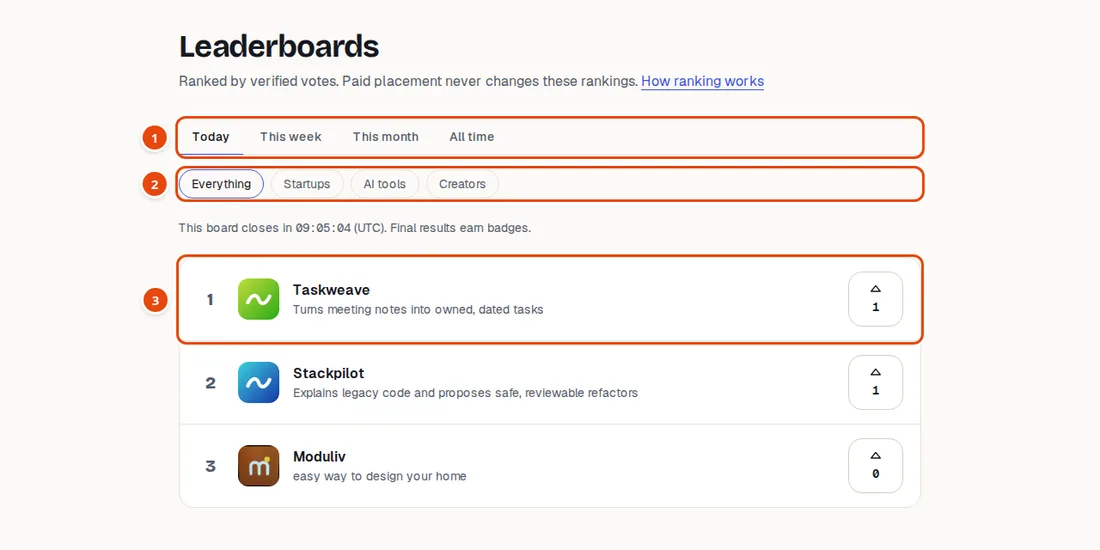
- Pick the period: today, this week, this month, all time
- Filter by type
- Rank, product and votes. Vote right here.
Creating your account
Free, and it takes a minute.
Sign up
Enter your name, email and a password. You must be 16 or older to join.
Use at least 10 characters. A short phrase of several words is easy to remember and hard to guess. Very common passwords such as “1234567890” are refused.
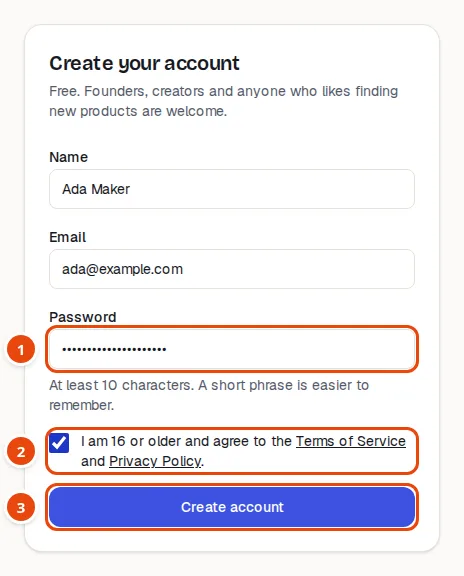
- Pick a long password or a short phrase of several words
- Confirm you are 16 or older
- Create account, then confirm your email
Confirm your email
We send you a message with a Confirm email button. The link works for 24 hours. If you cannot see it, check your spam folder.
Until you confirm, you can browse but you cannot vote, comment, or create listings.
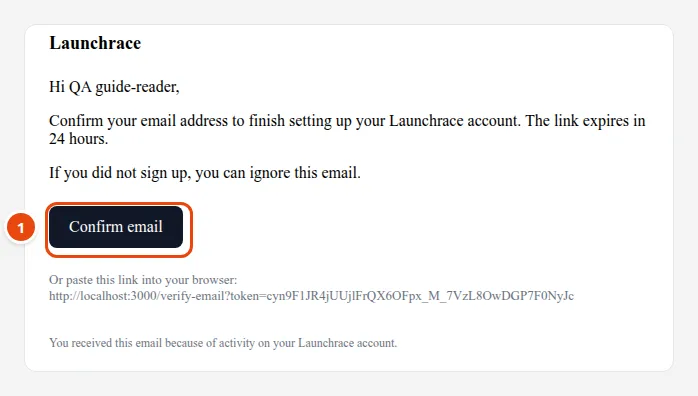
- Click Confirm email. The link works for 24 hours.
Listing your product
For makers. Listing is free. Nothing is public until a moderator approves it.
Open your dashboard
Your dashboard has four pages: Overview (your listings), Saved & following, Billing and Settings. Click New listing to begin.
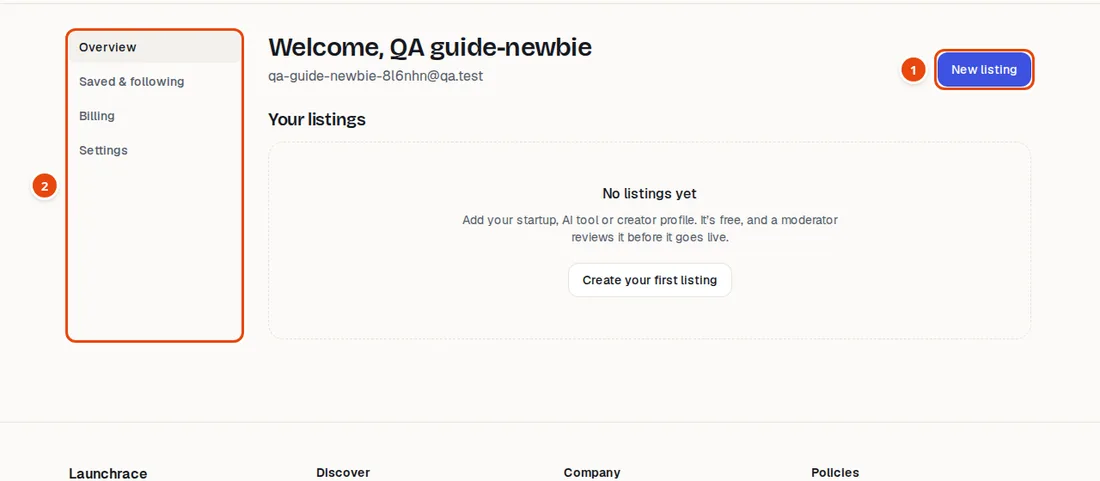
- Start here: New listing
- Your menu: listings, saved items, billing, settings
Describe what you made
Choose Startup, AI tool or Creator (a person, newsletter, channel or studio). Then fill in:
Name and Website (https only; tracking codes are removed, and IP addresses are not allowed). Tagline: one clear sentence of 10 to 120 characters. Description: what it does and who it is for, at least 50 characters, and Markdown works.
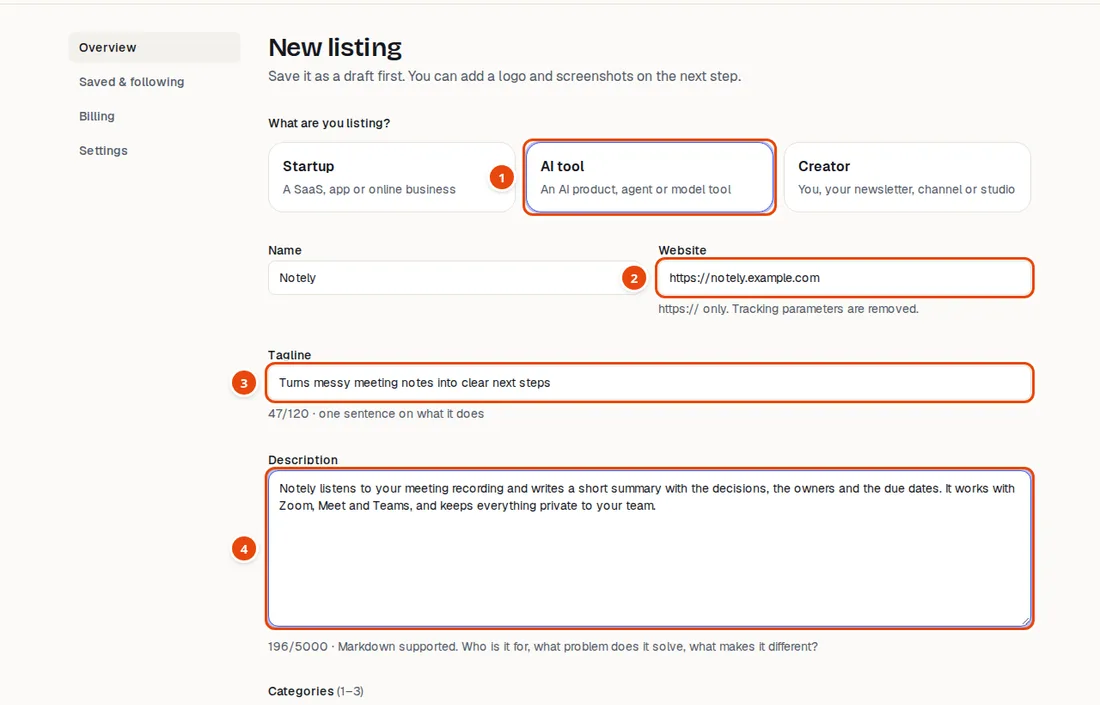
- Pick what you are listing
- Your website, https only. You can prove you own it later.
- One clear sentence, 10 to 120 characters
- What it does and who it is for (at least 50 characters to submit)
- Be specific and honest. “Turns messy meeting notes into clear next steps” beats “the best AI tool”.
Add categories and details
Pick one to three categories, add a few tags, say how it is priced and where it runs. Then press Create draft. A draft is only visible to you.
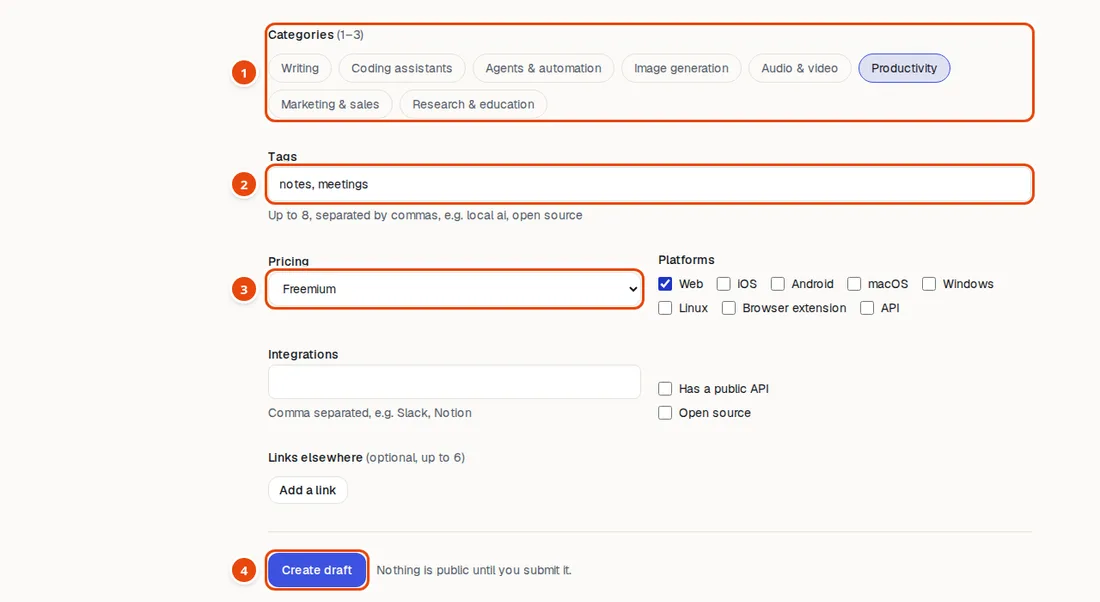
- Pick up to three categories
- A few tags help people find you
- Be honest about pricing
- Create draft. Only you can see it until you submit.
Add your logo and screenshots
A good logo and two or three screenshots make people trust a listing. Upload PNG, JPEG, WebP, GIF or AVIF, at least 64×64 pixels and up to 5 MB each, with up to six screenshots.
We convert images to WebP and strip hidden data such as location from photos.
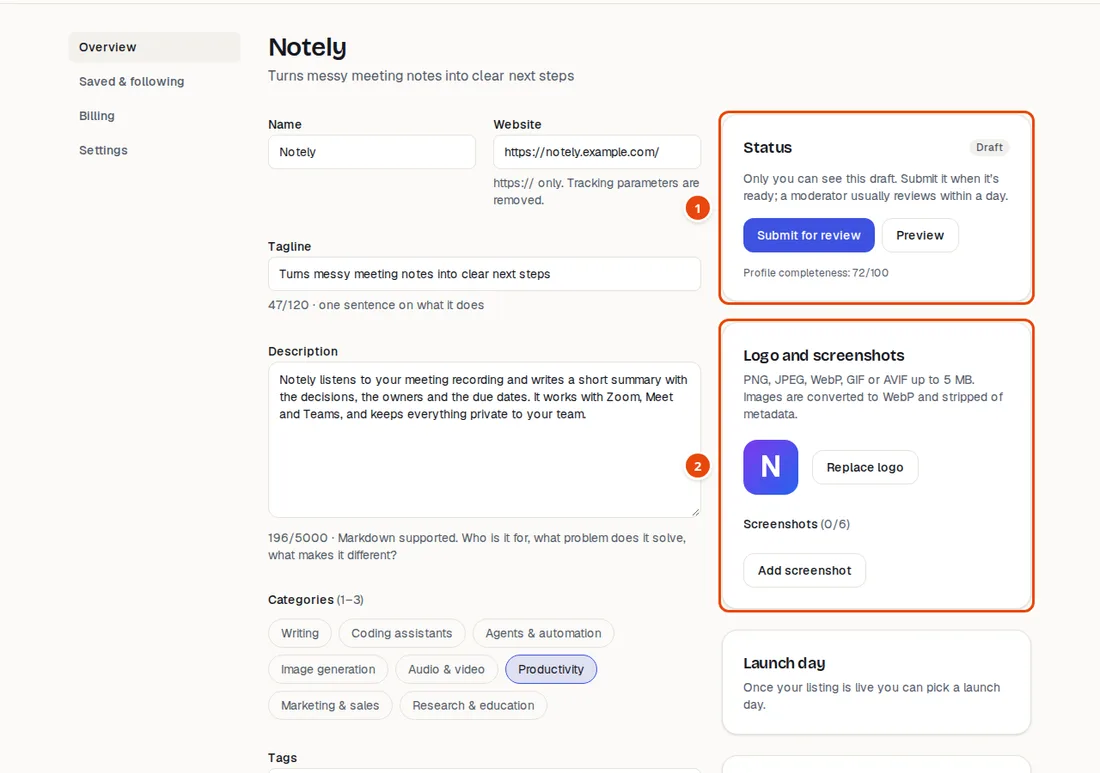
- Status: Draft. Submit for review when it is ready.
- Add your logo and screenshots
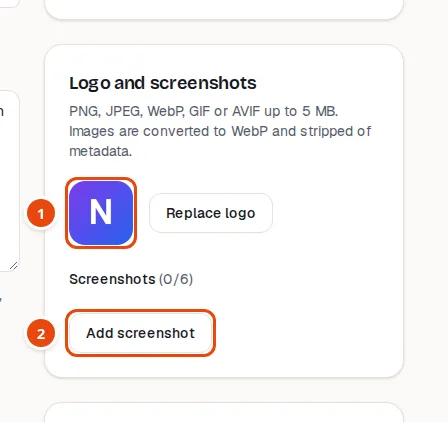
- Your logo (PNG, JPEG, WebP, GIF or AVIF, at least 64×64, up to 5 MB)
- Add screenshots of the product in use
Submit for review
When it looks right, press Submit for review on the Status card. You can press Preview first to see it as visitors will.
Automatic checks run first, then a moderator looks at it, usually within a day, and we aim for two business days at most. You will get an email with the result: approved, changes requested (with the reason) or rejected (with the reason). Edits to a live listing are reviewed the same way.
Pick your launch day
Once approved, choose a launch day up to 90 days ahead and write a one-line headline. Your launch is one UTC day, in the race with everyone else launching that day. You can cancel it any time before it starts.
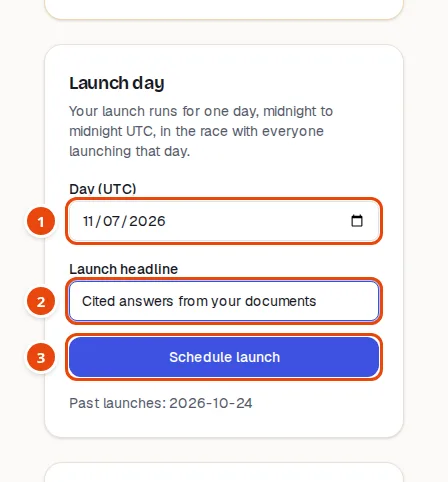
- Pick a day up to 90 days ahead (UTC)
- One line people see on launch day
- Schedule it. You can cancel any time before.
Earn the blue check
Prove you control your website and your listing gets a blue check (Verified owner; Verified creator for creator profiles). Do one of these, then press Check now:
Option A: add a DNS TXT record at the company that hosts your domain. Option B: put one small meta tag in your home page. It is free, and the check appears immediately.
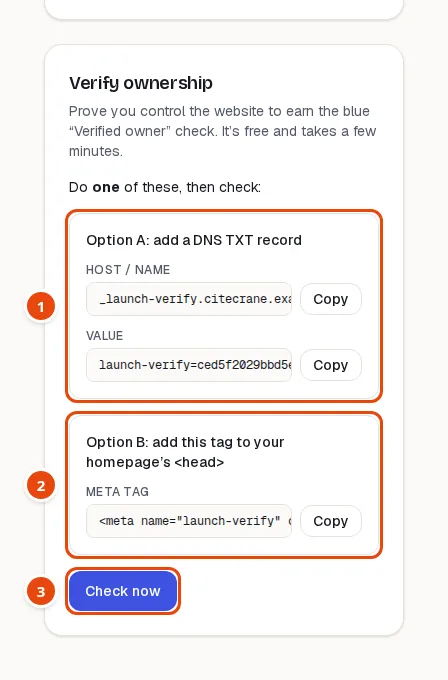
- Option A: add this record at the company that hosts your domain
- Option B: or put this tag in your home page
- Do one of them, then press Check now. The blue check appears at once.
- DNS changes can take a while to reach everyone. If the first check fails, wait a few minutes and try again.
Share your launch
On launch day, the Share your launch card gives you a ready-made image that shows your real rank, plus a suggested post. Download the wide or square version, copy the text, and ask your followers to vote.
The badge card gives you a small image to put on your own website that links back to your listing, and the Widgets page lets you show Launchrace rankings on your site.
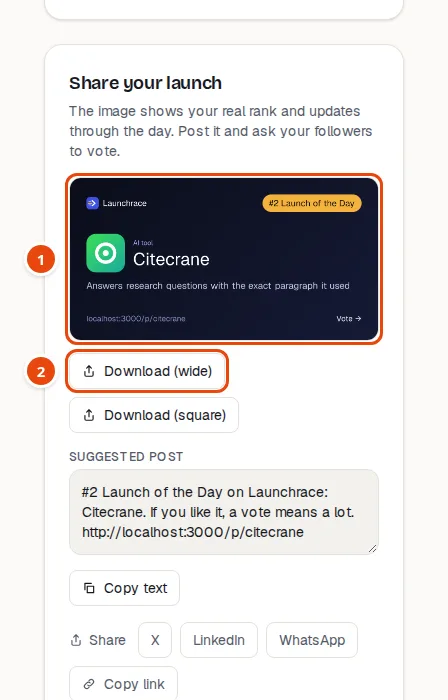
- A ready-made card and message to post
- Download the card or copy the text
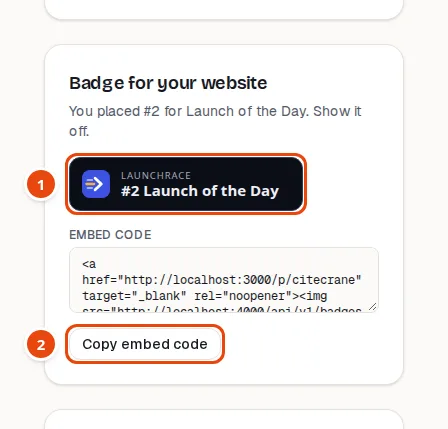
- Put this badge on your own site to link back to your listing
- Copy the HTML snippet
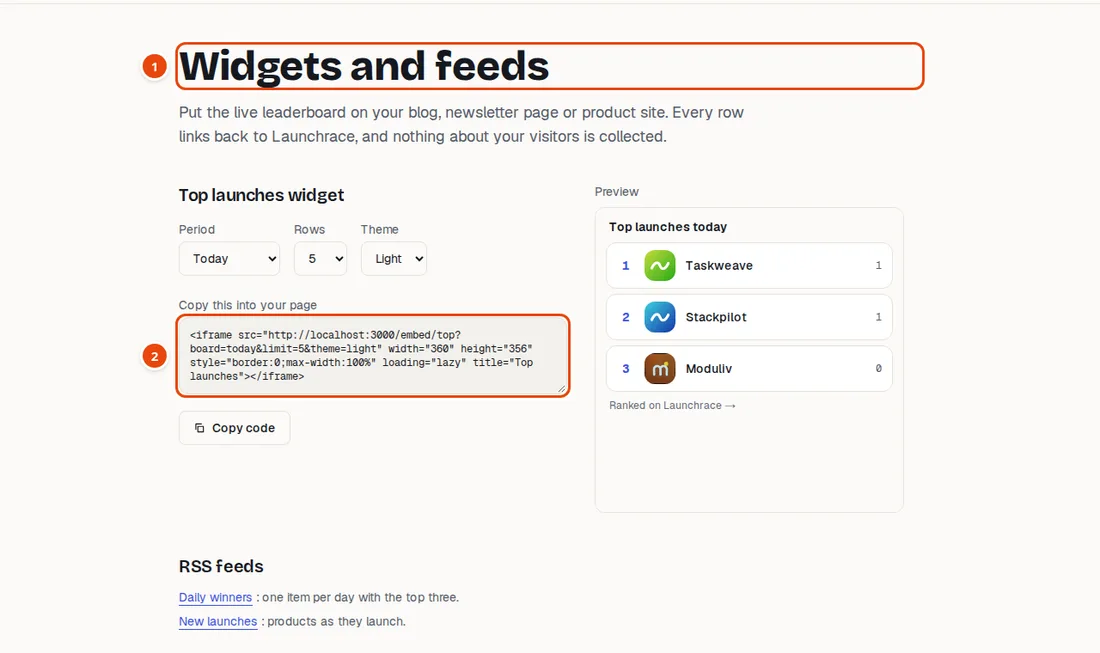
- Show Launchrace rankings on your own site, free
- Copy the code and paste it into your page
Promoting your launch (optional)
Rank is earned from votes and can never be bought. Paid placements are extra, always labelled Sponsored, and never change votes.
Fixed-price placements
On a live listing, the Promote card sells fixed slots: a home page spotlight, a category spotlight, a launch-day boost and a weekly digest sponsor. The price and what you get are shown before you pay.
Pick a start date on the calendar. Green days are free, amber days are filling fast and red days are fully booked. Grey days cannot be picked.
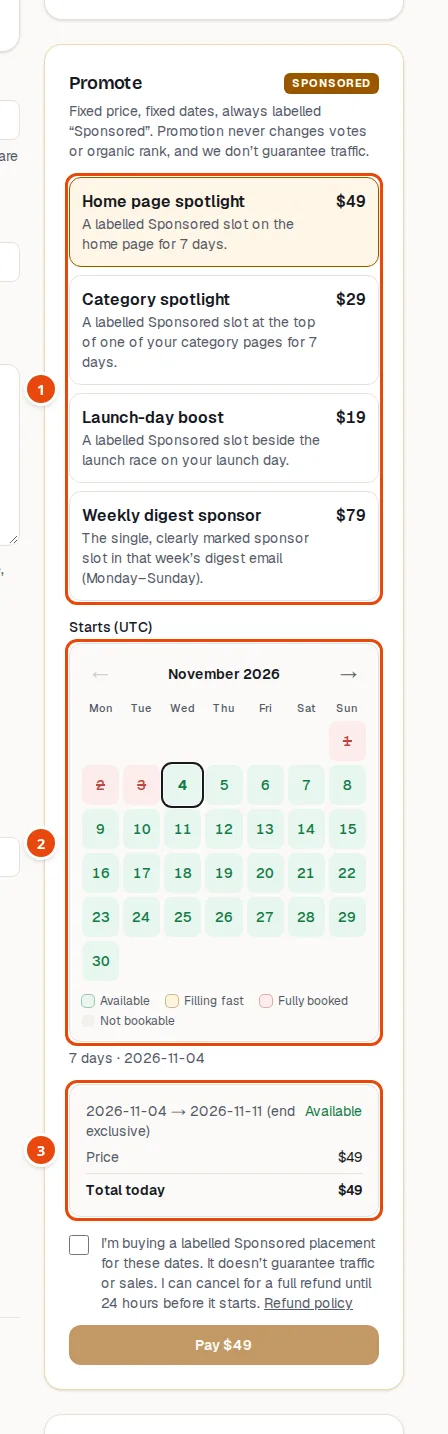
- Choose a placement. Fixed price, always labelled Sponsored.
- Green: free. Amber: filling fast. Red: fully booked.
- The price and your credit, before you pay
- You can cancel a scheduled promotion from Billing for a full refund until 24 hours before it starts.
- We never promise traffic or sales.
The Arena
The Arena is a monthly contest, and it works like an open auction. Every bid is public, on a ledger anyone can read. Your bids add up to your season total, and the highest totals rank first. If two totals are equal, the earlier one ranks higher.
The top 3 get the home page spotlight and the top 10 get a spotlight on their category pages. Everyone starts again at zero on the 1st (UTC).
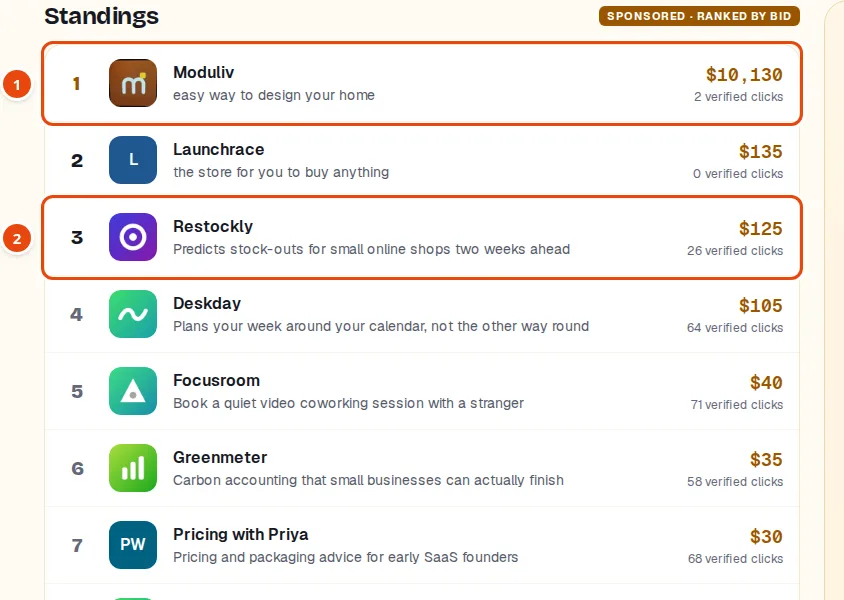
- Every bid is public. #1 leads, ties go to the earlier bid.
- Top 3 are on the home page; top 10 on their category pages
Place a bid
Open the Arena, choose your listing, and enter a whole-dollar amount. You see your new total and projected rank before you pay, and you confirm the exact amount on the secure checkout.
To take #1 you must finish at least $5 above the current leader. Matching them is not enough. The Take #1 button fills in the right amount for you.
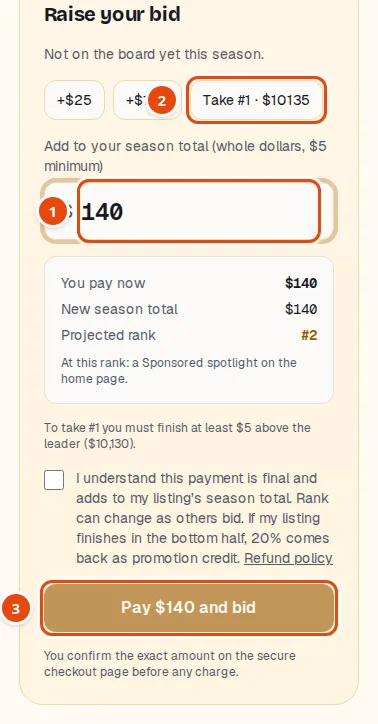
- Whole dollars. Your bid adds to your season total.
- Quick pick: the price to take #1
- You confirm the exact amount on the secure checkout
- Bids are final. A bid in the last 10 minutes of the season extends it by 10 minutes, so nobody can win by sniping.
- If your listing ends in the bottom half, 20% of what you spent comes back as promotion credit for fixed-price placements.
Payments, receipts and credit
Payments are handled by Dodo Payments, who charge you, add any sales tax that applies where you live, and email your invoice. We never see your card.
The Billing page lists every payment with a receipt, and shows your promotion credit. Credit is applied automatically to the next fixed-price placement. It has no cash value and cannot be used for Arena bids.
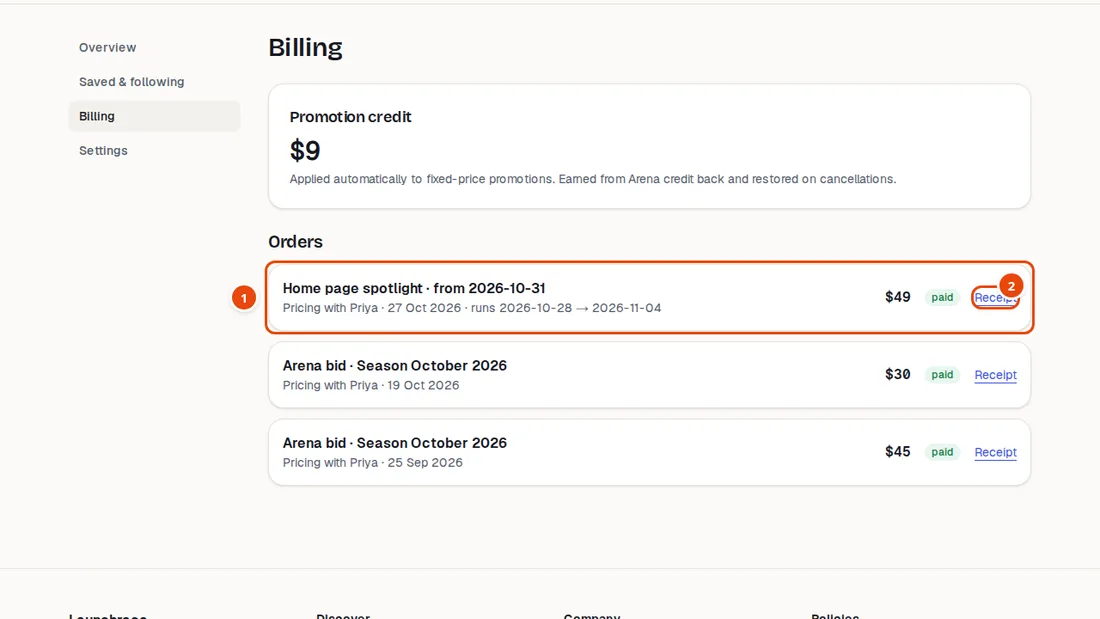
- Every payment, with its status
- Receipt for your records
Your account and settings
You decide what is public and which emails you get.
Public profile and email choices
A public maker profile is off until you publish one. It lists your live products and puts your name on them, so nobody is named unless they choose it. You can remove it any time.
Under Email notifications you choose which messages you want. Every email has a stop link.
Settings also has your password, two-factor sign-in (recommended), a list of your signed-in devices, and Delete account.
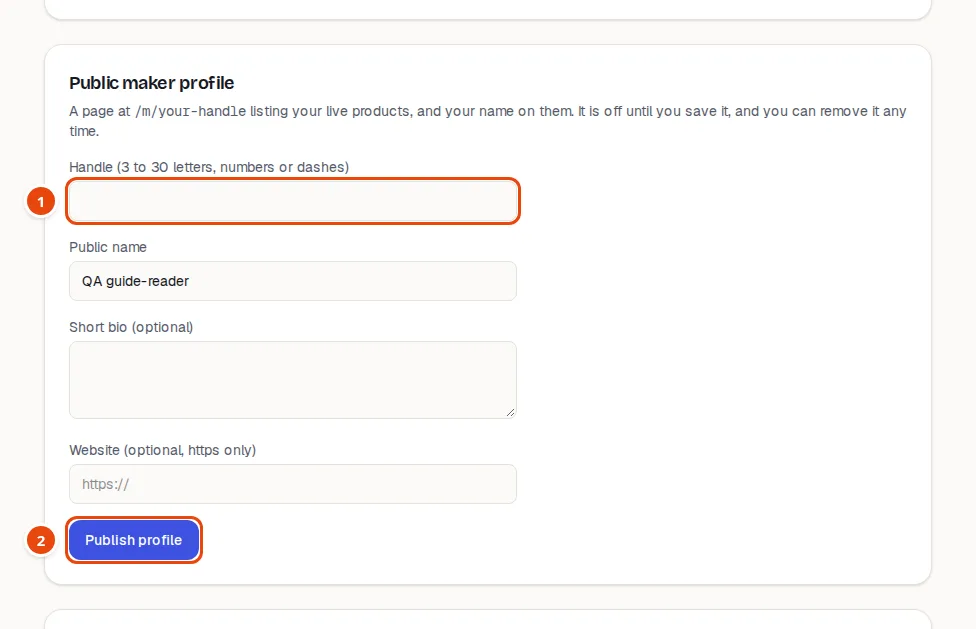
- Your public handle. A public page exists only if you publish one.
- Publish when you are ready. You can remove it any time.
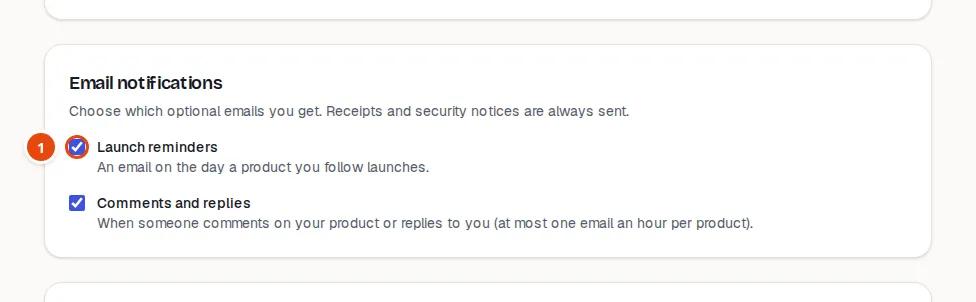
- Tick only the emails you want. Every email has a stop link.
On your phone
Everything works on a phone. The menu button opens the full menu, and the browse bar and live numbers sit under the header.
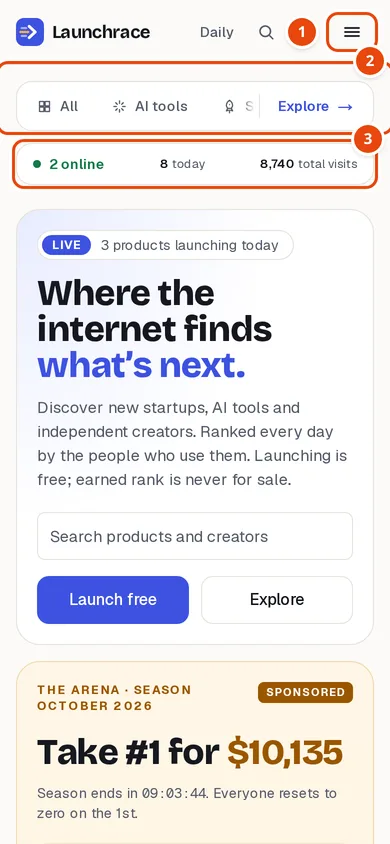
- Menu
- Swipe the pills sideways
- Live numbers
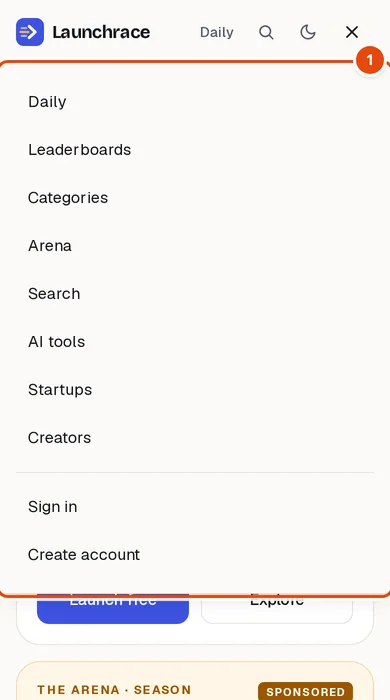
- Everything is one tap away
Fair play
- One person, one account. No vote trading, no “upvote my launch” groups, no fake accounts.
- Describe products accurately. No invented numbers or reviews.
- Paid placements are always labelled Sponsored and never change votes or organic rank.
- Moderators can hide or remove listings and comments that break the rules, and they always record why.
Quick answers
- I voted but the number did not change.
- If your account is less than 24 hours old, your vote is saved and will count once the account is a day old. The button shows a dashed border while it is waiting.
- My listing is not live yet.
- New listings and edits are reviewed by a moderator, usually within a day. You get an email with the result. Check your spam folder if you have not seen it.
- The ownership check fails.
- Make sure the DNS record or meta tag is exactly as shown, then wait a few minutes: DNS changes are not instant. Press Check now again.
- Can I change my listing after it is live?
- Yes. Edit it from your dashboard; the change is reviewed before visitors see it, and the old version stays up until then.
- I do not have a website. Can I still be listed?
- A website address is required today. A creator can use a link page or a profile page they control. Verified checks need a site you can add a record or tag to.
- Who do I ask for help?
- Use the Help page or the contact page and we will reply.
Still stuck? See the Help page or contact us.
6Join the conversation
Comments are plain text, up to 1,000 characters. Replies from the product’s makers carry a Maker badge.
A comment from a new account, or one with a link, waits for a quick check before it appears. Use Report on anything that is spam or abuse.